When I first came across Simplified I almost ignored it. The name felt generic. The website looked like every other AI tool landing page promising to “10x your productivity” with stock photos of people looking at laptops.
But then a friend in my marketing group mentioned she’d cancelled four separate subscriptions after switching to it. That got my attention.

So I spent a month using Simplified as my primary tool for content creation, design and social media management. Here’s what actually happened.
What Even is Simplified?
Simplified is what happens when someone looked at a marketer’s laptop and counted how many tabs they had open. Canva for design. ChatGPT for writing. Buffer for scheduling. Grammarly for editing. Some other tool for video.
Then they built one platform that does all of it.
That’s Simplified. It’s an all-in-one AI powered marketing platform that combines content writing, graphic design, video creation and social media scheduling in a single workspace.
The question is whether doing everything means doing nothing particularly well. After a month I have a pretty clear answer.
Getting Started.
Setup took less than ten minutes. Connect your social media accounts, set up your brand kit with your colors and fonts and you’re in.
The dashboard is clean. Maybe too clean initially — I spent the first day wondering where things were. But once you understand the layout it actually makes sense. Everything is organized around what you’re trying to create rather than by feature type.
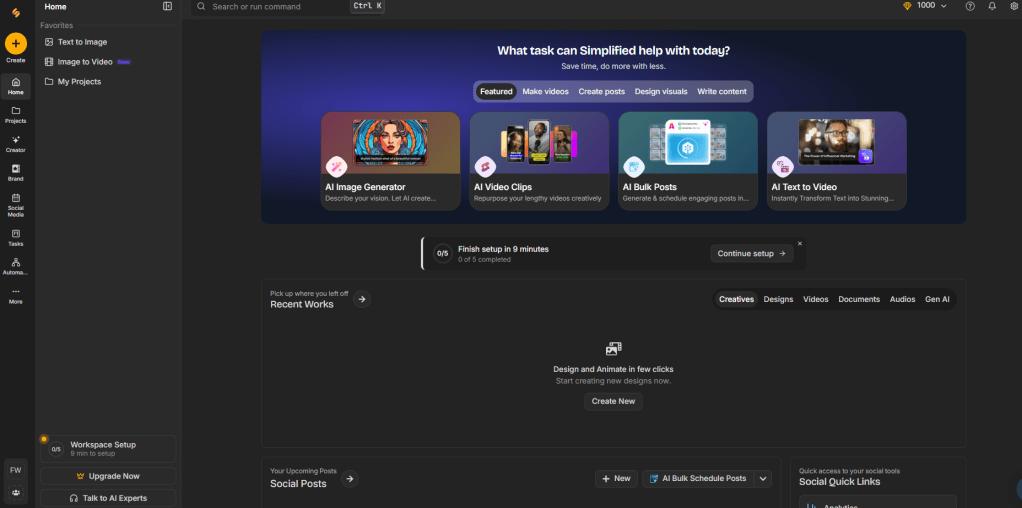
The AI writing assistant is front and center. Design tools are one click away. Your scheduled posts are visible in a calendar view. It doesn’t feel like five tools badly stitched together which is honestly what I expected.
The AI Writing — Actually Good
I write a lot. Blog posts, social media captions, email newsletters, ad copy. So I tested the AI writing tools hard.
The quality surprised me. Most AI writing tools produce generic corporate-sounding content that needs heavy editing before it’s usable. Simplified’s output was different. It felt less robotic than most competitors I’ve tested.
I used it primarily for:
Social media captions — genuinely impressive. Give it your topic, tone and platform and it produces multiple options. At least two or three out of every five were usable with minimal editing.
Blog post outlines — solid. Not ready to publish but a strong starting structure that saves 30 minutes of planning.
Ad copy — this is where it really shines. Short punchy copy for Facebook and Google ads was consistently good. I’d estimate it saved me two hours a week just on ad creative.
Long form blog posts — decent but needs more editing than short form. Don’t expect to publish without going through it yourself.
The Design Tools
Let me be clear — Canva is still better for pure design work. The template library is deeper and the customization options are more advanced.
But Simplified’s design tool is genuinely good for 80% of what marketers actually need. Social media graphics, presentation slides, YouTube thumbnails, banner ads. The templates are modern and the AI background remover works well.
What makes it interesting is the integration with the writing tool. You can generate copy and drop it straight into a design template without switching platforms. That workflow genuinely saves time.
I created about 40 graphics over the month. Most took under five minutes. For someone who is not a designer that’s significant.
Social Media Scheduling — Solid But Not Exceptional
The scheduling tool covers all the major platforms. Instagram, Facebook, Twitter, LinkedIn, TikTok, Pinterest. You can schedule posts, see them in a calendar view and get basic analytics.
It works. It’s not as advanced as dedicated tools like Buffer or Hootsuite for complex scheduling strategies. But if you’re a small business or solo creator who just needs posts to go out at the right time without manually posting — it handles it well.
The AI suggested posting times feature is a nice touch. It analyses your account and recommends when to post based on when your audience is most active.
Video Creation
This is the newest addition and honestly the weakest part of the platform right now. You can create short videos from text prompts or resize existing videos for different platforms.
It works for basic social media clips. But if you’re serious about video content you’ll still want a dedicated tool like InVideo or Synthesia. Simplified’s video features feel like they’re catching up rather than leading.
What I Actually Used Daily
After a month of testing here’s what I used every single day:
- ✅ AI caption writer for Instagram and LinkedIn
- ✅ Design tool for blog graphics and thumbnails
- ✅ Social media scheduler
- ✅ AI ad copy generator
What I used occasionally:
- 🔄 Long form blog writing
- 🔄 Video creation
Pricing — Is It Worth It?
| Plan | Price | What You Get |
|---|---|---|
| Free | $0/month | Limited but usable |
| Small Team | $15/month | Most features unlocked |
| Business | $30/month | Full access |
| Enterprise | Custom | Teams & agencies |
The free plan is genuinely usable for testing. The Small Team plan at $15/month is where it gets interesting — that’s less than most single tool subscriptions.
If you’re currently paying for Canva, a scheduling tool and an AI writer separately you’re probably spending $50–$80/month. Simplified consolidates that significantly.
Honest Pros and Cons
What I genuinely liked: ✅ Replaces multiple subscriptions with one ✅ AI writing quality is above average ✅ Clean interface that doesn’t feel overwhelming ✅ Design tools good enough for most use cases ✅ Scheduling works reliably ✅ Free plan is actually useful ✅ Regular updates — the team ships new features frequently
What bothered me: ❌ Video creation needs improvement ❌ Design tool not quite at Canva’s level ❌ Can feel slow on older computers ❌ Some AI writing outputs still need heavy editing ❌ Analytics could be more detailed ❌ Customer support response times vary
Who Should Use Simplified?
Simplified makes the most sense for:
- Solo content creators who need multiple tools but don’t want multiple subscriptions
- Small business owners handling their own marketing
- Freelance marketers managing multiple clients
- Bloggers who also manage social media
- Startups that need to move fast without a big team
It probably doesn’t make sense for:
- Professional designers who need Canva’s full capabilities
- Large marketing teams with specialized roles
- Heavy video creators who need dedicated tools
- Advanced social media managers needing deep analytics
My Final Take
A month in and Simplified is still open in my browser every day.
Is it the absolute best at any single thing? No. Canva beats it on design. Jasper beats it on writing quality. Dedicated schedulers beat it on analytics.
But here’s the thing — most of us don’t need the absolute best at everything. We need something that’s very good at most things without requiring five different subscriptions and five different workflows.
That’s exactly what Simplified delivers.
If you’re spending more than $30/month on separate marketing tools and constantly switching between apps — give it a proper try. The free plan is generous enough to test it seriously before committing.
Overall Rating: 4.4/5 ⭐
https://rebrand.ly/one-app-4f17d6
Disclosure: This post contains affiliate links.
 Smart AI Hub
Leave a comment