I am not a developer. I have never written code professionally. The closest I’ve come is copying a HTML snippet from Stack Overflow and hoping for the best.
So when I heard about Emergent — a platform that lets you build full stack web and mobile applications just by describing what you want in plain English — I was skeptical in the way that only a non-technical person who has been burned by “no code” promises before can be skeptical.
Two weeks later I’m writing this review having actually built and deployed a working web application. No developers. No coding bootcamp. No Stack Overflow panic.
What is Emergent?
Emergent is an AI powered development platform that transforms natural language descriptions into fully functional production ready applications. You describe what you want to build — in plain conversational English — and Emergent’s AI agents handle the design, coding and deployment.

It’s not a drag and drop website builder. It’s not a template system. You’re having a conversation with an AI that writes real code and builds real applications.
The platform has been around since 2024 and has grown to over 3 million users across 190+ countries. It’s a Y Combinator S24 company — which means it went through one of the most rigorous startup programs in the world. That context matters when you’re deciding whether to trust a relatively new platform.
They also recently launched Wingman — an autonomous AI agent that handles ongoing business tasks across Gmail, Outlook, Slack, CRMs and other business tools. More on that later.
Who Actually Uses Emergent?
Before getting into features it’s worth understanding who this is actually built for. Emergent serves five main groups:
IT Agencies who need to build client applications faster without expanding their development team.
SMB Owners who have business ideas but no technical background to execute them.
Product Managers who want to prototype and validate ideas quickly without waiting for developer resources.
Operations Teams who need custom internal tools but don’t have dedicated engineering support.
Individual Creators who want to build digital products without learning to code.
If you fall into any of these categories Emergent was built specifically for you.
Core Features — What You Can Actually Build
Web and Mobile Applications
This is the headline feature. Describe your application in plain language and Emergent builds it. The output isn’t a mock up or a prototype — it’s a fully deployed production ready application.
I tested this by describing a simple content tracking tool for my blog. Within minutes Emergent had generated a working application with a database, user interface and all the core functionality I described. I made changes by continuing the conversation — “add a column for publication date” or “make the header blue” — and it updated the application in real time.
The experience genuinely feels like working with a very fast developer who never gets frustrated with your questions.
Custom AI Agents
On the Pro plan you can build custom AI agents tailored to specific workflows. This is particularly powerful for businesses that need automated processes — content moderation, data processing, customer response systems — without hiring a machine learning engineer.
Powerful Integrations
Emergent connects with the tools most businesses already use. Google Sheets, Airtable, Stripe, GitHub and more. The integrations mean the applications you build aren’t isolated — they plug into your existing workflow.
GitHub Integration
For anyone with technical team members Emergent connects to GitHub. Your team can collaborate on Emergent projects the same way they’d collaborate on any codebase. You can also fork tasks — which means taking an Emergent built project and continuing development independently.
Wingman — The Autonomous AI Agent
This launched in April 2026 and it’s worth highlighting separately. Wingman is an always-on AI agent that handles ongoing business tasks across the tools you already use — Gmail, Outlook, Google Calendar, Slack, CRMs, GitHub and more.
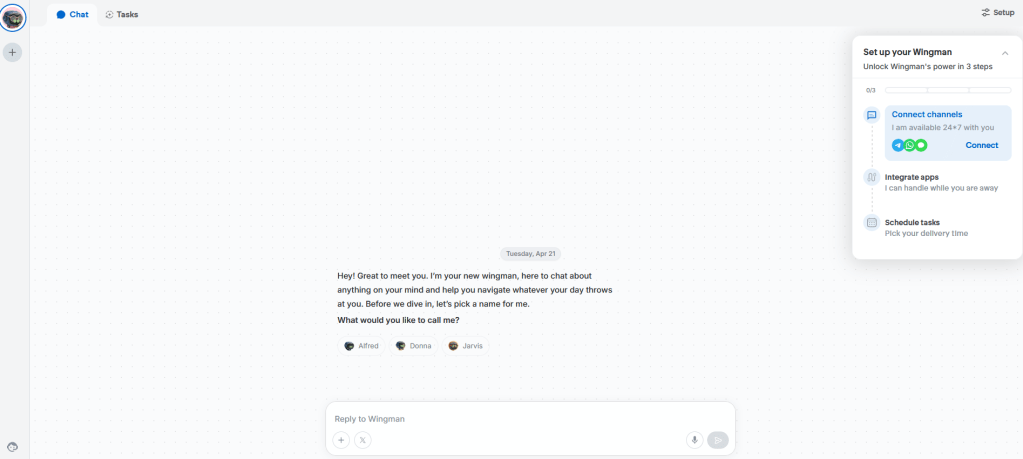
You can customize Wingman’s tone and personality so it operates as a trusted business operator rather than a generic bot. It handles scheduling, social media management, sales support, research analysis and hiring workflows autonomously.
For small business owners managing everything themselves this is significant. Wingman effectively gives you an AI assistant that works across your entire business stack without you needing to manually trigger anything.
The Building Experience — Honest Assessment
I spent two weeks building various projects on Emergent. Here’s what the actual experience is like.
The conversation interface is genuinely intuitive. You don’t need any special prompting knowledge. Describe what you want the way you’d describe it to a colleague and Emergent understands. I made intentionally vague requests to test this — “I need something to track my blog performance” — and it asked clarifying questions before building rather than just guessing.
Iteration is fast. Making changes is as simple as saying what you want changed. There’s no digging through menus or figuring out which setting controls what. You just describe the change and it happens.
Complex projects need more guidance. For simple applications the results are impressive. For more complex multi-feature applications you need to be more specific in your descriptions. The AI is powerful but it can’t read your mind. Vague descriptions produce functional but generic results.
The credit system requires planning. Every action on Emergent uses credits. Simple tasks use fewer credits, complex builds use more. On the free plan you get 10 monthly credits which is enough to experiment but not enough to build anything substantial. The Standard plan at $20/month gives you 100 credits which is workable for most small projects.
Pricing — Is It Worth It?
| Plan | Price | Credits | Best For |
|---|---|---|---|
| Free | $0/month | 10 credits | Testing |
| Standard | $20/month | 100 credits | First-time builders |
| Pro | $200/month | 750 credits | Serious creators |
| Enterprise | Custom | Custom | Large teams |
The free plan is genuinely enough to test the platform and understand what it can do. The Standard plan at $20/month hits a sweet spot for freelancers and small businesses building their first applications.
The Pro plan at $200/month is steep but the features justify it for anyone building seriously — 1M token context window, custom AI agent creation, ultra thinking mode and priority support. For agencies billing clients for custom applications the Pro plan pays for itself quickly.
Honest Pros and Cons
What genuinely impressed me: ✅ Actually builds real working applications — not mock ups ✅ Conversation interface is intuitive for non-technical users ✅ Wingman integration is genuinely useful for business automation ✅ GitHub integration for technical teams ✅ SOC 2 Type 1 certified — takes security seriously ✅ 3M+ users across 190 countries — proven at scale ✅ Y Combinator backed — credible and well resourced ✅ Free plan available to test properly
What frustrated me: ❌ Credit system can feel limiting on lower plans ❌ Complex projects need very specific descriptions ❌ Pro plan is expensive for individual creators ❌ Relatively new platform — still maturing
Real Use Cases That Make Sense
After two weeks of testing here are the scenarios where Emergent genuinely delivers:
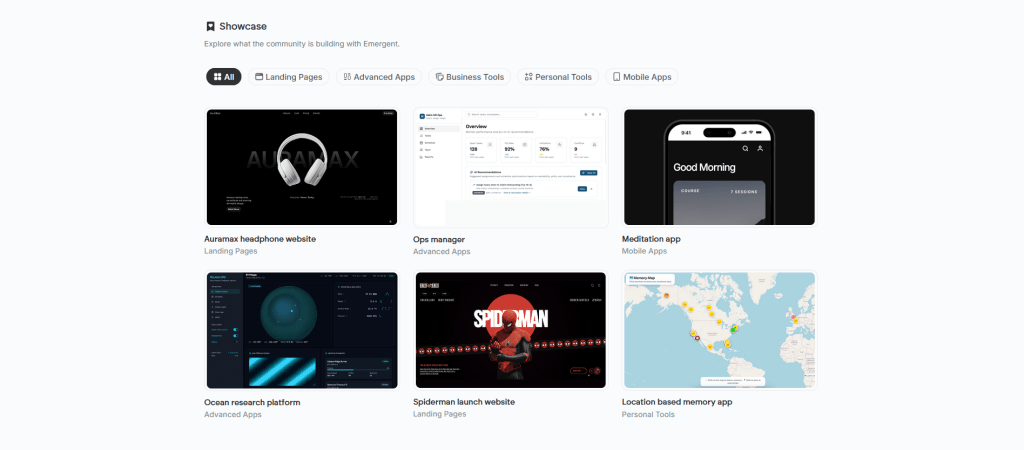
Freelancers building client tools — Build custom dashboards, tracking systems and internal tools for clients without a development background. Bill for the application, use Emergent to build it. The margin is significant.
Small business owners — Build the custom tool your business actually needs instead of forcing your workflow into generic software. Inventory systems, customer tracking, booking tools — describe what you need and build it.
Product managers validating ideas — Build a functional prototype in hours instead of weeks. Test with real users before committing to full development resources.
Content creators — Build tools for your own workflow. Subscriber management, content calendars, analytics dashboards. Things that would normally require hiring a developer.
Emergent vs The Competition
| Platform | Best For | No-Code | Real Apps | Price |
|---|---|---|---|---|
| Emergent | Full apps via AI | ✅ | ✅ | From $0 |
| Webflow | Website design | ✅ | Partial | From $14 |
| Bubble | Web apps | ✅ | ✅ | From $29 |
| Replit | Coding focused | ❌ | ✅ | From $0 |
| Cursor | Developers only | ❌ | ✅ | From $20 |
The key difference is the conversation interface. Other platforms still require you to understand their specific logic and systems. Emergent lets you work in plain English throughout.
Should You Try Emergent?
If you’ve ever had a software idea but no way to build it — yes.
If you’re a freelancer looking to offer custom application development as a service — yes.
If you’re a small business owner tired of forcing your processes into software built for someone else — yes.
The free plan gives you enough to genuinely test it. Start there, build something small, see if the experience matches what you need.
The honest ceiling is that very complex applications still benefit from real developer involvement. Emergent is remarkable for what it achieves but it’s not a complete replacement for experienced engineering on genuinely complex projects.
For the vast majority of things most small businesses and creators actually need to build though — it’s more than capable.
Overall Rating: 4.8/5 ⭐
Try Emergent Free → https://app.emergent.sh/?via=smartaihub
Disclosure: This post contains affiliate links.
 Smart AI Hub
Leave a comment